Slideshare

mercoledì 2 settembre 2015

Promoting marketing events using Facebook

A tutorial example of using Facebook Ads for Event Promotion

Promoting live events might be the most challenging form of digital marketing campaign you will ever work on.  Or so it’s been my experience over the past few years with our monthly MnSearch events and one-off events like LocalU Twin Cities.

Not only do you have to try to market an event based on features, benefits and price points, but you also have to try and convince someone that it’s worth taking time out of their work day or personal life, and drive across town to attend.  And all for 'One Night Only!'.

This is the exact opposite from most Paid Search campaigns that can be built to be relatively 'Evergreen'.

Because attendance can fluctuate greatly, and breaking even is often the priority goal, we are continually looking for very cost effective means of building awareness for events without breaking the bank.

All of this led us to Facebook ads.

Why Facebook Ads for event promotion?

  • Cost: Let’s address this first off.  Cost is often a primary driver of trying new advertising mediums for unproven verticals or products.  Since MnSearch is a non-profit with every little budget for advertising, we have to be careful with what and where we spend our limited resources.  The DYI ad platform with a relatively low cost-per-click made it an easy decision for trying Facebook ads for our events.  Our initial monthly budget was only $40 per month.
  • Audience Size: Facebook is the undisputed heavyweight of social networks.  Odds are that most of the people you want to reach will be on Facebook.  For us, being a digital marketing association, it was a very easy, and accurate, assumption that other search marketers would be there.  We just needed to figure out how to target them…
  • Demographic and Interest Targeting: Event marketers will love Facebook for its targeting features since most events are for specific people with specific interests.In the case of MnSearch, our audience lives in close approximation to the Twin Cities, is a working professional 21 years of age or older, and works in a web-based field with interests in search, social and other digital marketing topics.
  • Community Building (+ Social): As I mentioned earlier, our goal is to build a search marketing community here in Minnesota.  This includes building a community online as well as at our in-person networking events.

The extra benefit that Facebook Ads provided us is to the growth to our social community.  Every month that we advertise our events on Facebook, we see a 78% growth in our month-over-month social connections.

This is above the normal growth that we see during months where no advertising has occurred and includes Facebook followers, Twitter followers and LinkedIn community members, not to mention the lift in official MnSearch Association memberships.

All of this with only a small $40 monthly budget. I wonder what would happen if we had budget in the $400 range, or $4,000…?  That’s probably a test and post for another day.

Recommended assets for marketing an event through Facebook Ads

Facebook has a fairly flexible ad platform for marketing events.  I always recommend creating the following assets for in order to utilize the main Ad options for events and get the most out of them.

  • 1. Create an Event page on your website, event registration platform or both.

In the era of inbound marketing, creating your own (owned) content for events is a must. To do so you will only need to create a detailed event page on your website, blog or an event registration engine that you manage and control. Not only will this make it easy for you to update your event listing as needed, but you will be able to gain additional traffic, links and social equity over time to a place that you can carry forward.

msnearchgoogleadwords

  • 2. Create a Facebook Event through your Facebook Page

There is a saying that advertisers have in regards to Facebook users and conversions.  It is: 'Facebook users like to stay on Facebook.' This saying is in relation to gaining higher conversion rates from Facebook ads if you can craft an offer or landing page that does not take the user out of Facebook.  It is not necessary, but something to keep in mind when planning your campaign.

Also, creating this page is important if you want to use the Facebook ad option for advertising a Facebook event.  This is a step that I recommend so that you gain access to the additional ad format.

This event page will include information about your event including date, time, location, event description, and a link to the event ticket registration page on your main website or registration platform.

The optional attendee list is a great form of social proof.  Enabling it will help increase conversions by people being able to see that they are not alone and hopefully know a few others that are attending.

googleadwordscampaignbradgeddes

  • Share Your Event Post(s) on Facebook to establish initial social proof

One of the great advantages to promoting events on Facebook it the social proof that you gain when someone joins, likes, or comments on your Event. This helps demystify who you are as an organization for users when they see someone they know that has taken an action on the event.

In preparing for my event ad campaigns I always share event assets prior to advertising so that they gain some social equity.  This will help get your ads off and running faster than new ones that do not have any 'likes'.

When sharing your assets, I recommend a staggered schedule so that your audience is not inundated with messages about the same event all at one time. Scheduling them to post 4-8 hours, or 1-3 days apart will help to avoid this.

Staggered schedule for Facebook content for your event

Here is a schedule I like to follow and considerations:

  • 1. Event action #1 – AM, Day 1: Main Event Post

I often look to make my 1st event post to Facebook during the morning of what I consider day 1 of promotion. This is the link to the page with full details from the website, blog or event registration platform.  I typically like to post this on a Tuesday or Wednesday during the 9 am hour.

Tip: You do not have the opportunity to edit the copy of your Posts when turning them into Sponsored Stories (ads). 

Because of this I highly recommend editing this post to the following character limits so that it will show up correctly in streams without getting truncat…

  • 90’ish character max as the status copy area above the post box.
  • Edit and keep important Title copy of the post in the 1st 30'ish characters (blue box area).  It’s Ad will truncate longer sponsored post titles.
  • 142'ish character post description (blue box area).  Ad will truncate longer copy.

bradgeddesfacebook

As a side note: remember to proofread your edited copy before posting:)

  • 2. Event action #2 – AM, Day 2: Create sponsored story Ad from Main Event Post

Since taking a post and creating a Promoted Page Post (aka Sponsored Story Ad) will not create another entry on your page’s timeline, I recommend doing this on the morning of Day 2, or late in the day of Day 1.  The reason for the delay is so that your original post has time to gather social equity that will help engagement and reach when it’s turned into an ad.

advertiseonfacebook

  • 3. Event action #3 – AM, Day 2: Create Facebook Event

Just like when creating the Main Event Post (above), I typically line up the Facebook Event creation to be done during the morning of day 2, or later, so that we are not posting our Event messages too close together.

Character Limit Note: You’ll need to create new copy for Promoted Event Ads.  Because of this you will not need to adhere to any character limits when creating your initial Facebook Event posting.

facebookeventposting

  • 4. Event action #4 – PM, Day 2: Share Facebook Event

As you can see from the example below, creating the Facebook Event automatically posts it to your follower’s stream, so you’ll want to balance this with sharing the event at a later time so that your postings are pushed out one on top of the other.  This spreads out the exposure and gives you more time to gain social equity before promoting via Facebook ads.

sharefacebookevent

  • 5. Event Action #5 – AM, Day 3: Create Ad for your Facebook Event

Now that your Facebook Event has had time to curate some social activity it’s time to turn it into an Ad.  You’ll find this ad option by going to your 'Create Ad' section for you Page and your event should be listed towards the bottom of the options.

createadfacebookevent

You should not that you Event Ads will need to adhere to the following structure:

  • 25 character max headline.
  • 90 character max text description.
  • 100 px wide x 72 px tall event image.

Targeting the Right Audience (Ad Settings)

Most of the audience targeting and ad settings can be used for almost all of the different ad formats that Facebook offers. Here are the popular settings that I use and some that you should consider for your campaigns.

  • Location: Most events that happen 'in real life' will have an audience that resides within a geographic area. This could be North America, the United States, in a specific state like Minnesota or Oregon, or within driving distance from the event location.  We often choose a radius targeting of 25 or 50 miles from where we are holding our monthly events here in the Twin Cities.  We’ll increase this reach to statewide for larger events.
  • Age: Are you promoting an event that is intended for an adult audience?  Is your event going to provide alcohol and needs to target the 21 and over crowd?  Our audience is made up of mostly working professionals and being able to target people that are 21+ is a great feature for marketing our events.
  • Gender: Are you looking to market an event that primarily attracts women or men? If so, then you can select the gender of users to target and greatly reduce your audience size and thus ad spend. If you don’t know, I’d recommend splitting your campaign into 2 and testing the male vs. female audience and see which one performs better for you.

facebookadaudience

  • Precise Interests: Targeting users by their Interests is one of the best features of Facebook ads.  For instance, if your event is a children’s broadway show, then your targeted audience might have an interest in Sesame Street.For MnSearch, we are looking to reach working professionals whom have shown an interest in digital marketing topics such as PPC and Google AdWords.
  • Suggested Likes and Interests: Facebook tries to help you find additional Interests that you may not have found yet by making suggestions based on the Precise Interests that you have previously selected. This is by no means perfect, but can help uncover some real gems that you might not have thought of previously.

facebookinterests

  • Broad Categories: Adding Broad Categories can help narrow your ad reach to better audience. Using the children’s broadway show example from above, narrowing the scope of your reach to Parents would be a good idea to consider.

facebookbroadcategories

  • Connections: I typically recommend using the Advanced Connection Targeting option to fine-tune who sees your ads. When trying to target a new audience that has not yet been exposed to any or our current event messaging or our MnSearch brand, I will restrict the ads from being shown to people already connected to us so as to reduce the possibility of annoying our audience with repetitive messaging.
  • Friends of Connections: People often connect based on likes and interested. Targeting users who are friends of people whom like you page is a nice option for building awareness for people whom are likely to be interested.  So if you are advertising for that children’s broadway show, you might want to target Friends of Connections and see how that performs

Facebookconnections

  • Interested In and Relationship Status: Targeting users based on sexual preference and relationship status might be the most unused targeting features on Facebook. However, if the event you are trying to market is a relationship seminar, geared towards parents, or single people, these setting can be powerful for reaching your audience.

facebookinterestedinrelationship

  • Languages: Targeting users based on their language preferences is pretty straight forward. I typically choose all of the English options available. In internet age with laptops and smartphones that can travel, and personal settings that can be changed and forgotten o be changed back, it is usually best to choose more.  As for choosing non-English languages such as Spanish or French, this is always an option, however you need to be careful as the person whom clicks you ad might not be able to read your event page if it’s not in their native language.
  • Education: User education can sometimes be irrelevant, but should never be ignored for consideration.  If your event is a Justin Beiber concert, then you might select the In High School option.  If it’s a career fair, then the In College crowd would probably work very well.  And if you’re marketing high-end timeshares in a warm climate, then you might want to consider testing the College Grad option.
  • Workplaces: I’ve experienced that more often than not, big companies can be found in the workplaces option, while smaller well known ones will not.  However, if your event is say, a tech event about the latest mobile devices, then targeting Best Buy employees might suit you.  Or if it’s a convention about hospitality, then Best Western would be an option for you.  It’s never a bad idea to see if a company is listed that could be a good fit for your campaign.

facebooklanguageducation

A Few Thoughts about Images

The ability to have images that draw attention is one of the biggest advantages of Facebook ads. Selecting the right image to go with you ads can be the difference between successfully reaching your audience and completely being ignored.

  • People draw attention:It’s a widely known rule-of-thumb that images of people in banner ads and on landing pages draw more attention and can increase conversion rates over other graphics without people. Of course there are always exceptions to any rule.

    My advice is to make it common practice to test you Ad Images with people vs. ones without people to see which makes a better impact on your campaigns.

  • Bright colours draw attention on Facebook: Let’s face it.  Facebook.com is kind of boring.  Blue. Grey. Light blue. Dark blue. Other than the little red dot at the top of the page, that’s pretty much the colour palette.  For marketers this is a great opportunity to inject color into your Image Ads to make them stand out.  I recommend using bold colors such as Red, Orange, Yellow and bright Green.

Facebookimagecolours

At MnSearch we create special badges for each of our monthly Search Snippets events that we place on our event pages.  These images show up with our social posts on Facebook, LinkedIn and Google+ and get extra use in our Facebook Event campaigns.

Consider the colour of the image when you are selecting if for you event ad images.  If you have more than one image to run, test them against each other to see which performs better with your audience.

  • Sponsored Post Ad Images vs. Event Ad Images: I highly recommend using different images for you Event Ads than you use for your Promoted Posts.  This will help to reduce ad fatigue, give you additional ways to grab attention akin to split-testing, and give your ads a fresh perspective and second look when the same user views them.

Create and manage demographic audiences in Facebook Power Editor

Because finding, managing and tracking audiences can be tricky for time sensitive Events, I recommend establishing your Audiences within the Facebook Power Editor.

These Audiences will allow you to easily add Interests and fine-tune your demographic targeting for use with future event promotions without having to create new ones each time.

FacebookdemographicsPowerEditor

How are your event promotions going?

As I mentioned earlier, Facebook is a fairly flexible ad platform for marketing events and this post contains just a few of the main ways that you can promote your events.  So feel free to let me know if you have any must-haves that I did not include here and I’ll be sure to give you a shout out in my next event post.


from Smart Insights http://ift.tt/1VwbPtu
via IFTTT

Google now integrating Twitter into its search results [@SmartInsights alert]

Twitter suddenly becomes more important to marketers with the latest integration - now rolled out to desktop as well as mobile

Importance: ★★★★★ For Digital Marketers, Social Media Marketers and SEO consultants

Recommended link: Google's original announcement of new Twitter Integration

So, they've made up! You may remember how Google used to partner with Twitter and take their firehose to display tweets in near real-time - I remember it was sub ten seconds. Then they fell out and this feature disappeared back in July 2011. Well a new form of the integration is back as has been previewed over the last few months. I've been taking a look to see how significant it will be for businesses. It looks like a great deal for Twitter to me and an acknowledgment by Google that Twitter, not Google+ is THE source for real-time updates as it had hoped.

What marketers need to know about Google's Twitter integration

1. The new 'Popular on Twitter' feature was available on mobile only to start with, now on desktop too.

This integrated was first launched in mobile on the 19th May 2015, when we originally announced it, but we've updated this post since it's now live on desktop as well, meaning it has finished rolling out worldwide.

Google announced the rollout with a Tweet to Twitter, and Twitter was pretty happy about it!

One example of the importance of this change shows in this example of a brand or navigational or search, which you'll know is one of the main ways people reach sites when they're already aware of the business.

Facebook-Google brand example

You can see that Twitter is now in second natural position after the Google Sitelinks and displacing Facebook to third even though this is more important.

If you update your Twitter regularly it will populate results straightaway - within seconds and displays the time of the update with an image to help show your brand as more dynamic.

2. Twitter results are prominent for some search results only, displaying in a 'Popular in Twitter' carousel 'OneBox'. This gives a link through to the Twitter Profile and recent tweets:
Example of Google Twitter integration

In some cases, as here for a celeb, the carousel appears right at the top of the listing. I'm surprised about this since I'm not sure this is what users will want, but it does vary by type of search and Google's OneBox featuring different types of content such as images automagically changes position depending on how popular it is.

3. It's typically displaying for 'trending topics' only not for product or brand information. As would be expected, it only displays for when something is being shared actively on Twitter. This means the 'Popular on Twitter' often displays below the 'News' box when that is triggered. Adding a hashtag also makes the carousel more likely to appear.

So it looks like it's should encourage more 'Real-Time marketing' where brands look to be involved in broader conversations.

Google's intro post suggests this too:

'It’s a great way to get real-time info when something is happening. And it’s another way for organizations and people on Twitter to reach a global audience at the most relevant moments'.

Brands may appear if Twitter is added to the search string:

brand twitter example


4. It was in English only originally but it is being rolled-out to all languages. Google say:

'To start, we’re launching this on Google.com in English in the Google app (on Android and iOS) and on mobile browsers, rolling out gradually. We’re working on bringing it to more languages and to desktop, so stay tuned'.


from Smart Insights http://ift.tt/1Ah9mgp
via IFTTT

6 Research Tactics to Drive Social Media Success

Examples and tools showing that, to get great results with social media, you base it on insight

Let's say you’re boarding an airplane, and you strike up a conversation with the pilot. You ask how the weather is looking. He shrugs and says, “I don’t know; I haven’t checked the forecast. I’m just going with my gut.”

Unless you have a death wish, you’d probably turn around and get off the plane. You know a safe journey requires research, but when it comes to social media, many marketers skip that step. Instead of checking the social media forecast, they fly blind.

Social media marketing

As social media strategist Marji Sherman learned when she started at Kohler, overlooking the social media forecast can have serious consequences. Her research revealed that the company’s social media strategy was missing the mark. Examining the data, Sherman found that much of what people thought was working, well, wasn’t.

The good news is that research can help brands readjust. When Sherman noticed that plumbers were sharing Kohler’s posts on Facebook, she decided to edit the content to make it speak more directly to tradespeople, who would then share it with their followers. Although the brand usually sells to suppliers, Sherman knew it was important for consumers to feel connected to its products, too.

Her findings allowed Kohler to correct its course and connect with the appropriate audience. With the right research, your brand can do the same. Here are six crucial tactics to shape your social strategy:

1. Know Your Audience

Social media makes it possible to study consumers deeper than ever before. It allows brands to learn their followers’ typical login times, the celebrities their followers are tracking, and even the brands of peanut butter their followers prefer. This allows brands to create more detailed customer personas and to shape campaigns that resonate with their respective audiences.

As you examine the data, try to answer a few key questions: What does my audience read or watch? Which social networks do they use? What problems can my brand solve for them?

Tools to try: Facebook Audience Insights allows you to filter audience data by region, gender, age, or page likes — and it’s free. Another great tool exists called Affinio. For a fee, Affinio allows its users to retrieve a deep analysis of their Twitter, Facebook, and Instagram audiences while also showing audience interests and how all of it ties together.

2. Know Your Platforms

All platforms are not created equal. Demographics vary by site, and you’ll want to tailor your content, timing, and messaging to each network. For example, your research may show that your most active Twitter followers aren’t on Instagram or that certain content performs better on Pinterest than on Facebook. As you get to know each platform, pay attention to users’ average age, gender makeup, and usage patterns. Find out when users log on and what type of content — photos, GIFs, text updates, or videos — they’re most likely to engage with.

Tools to try: Pew’s annual Internet research is the gold standard for understanding social media trends in the U.S. Through this report, users can learn who is accessing social media in America and why. For data on content, podcasting, and other new technologies, I recommend using research from Edison.

3. Know Your Influencers

The social media age offers powerful co-branding opportunities, but influencers’ contributions aren’t useful if you’re partnering with content creators who don’t reach your audience. Use social listening and analytics tools to discover which influencers, celebrities, and other brands your audience likes. Then, consider how you can achieve your campaign goals by partnering with them.

Tools to try: Little Bird is my favorite tool for finding topical influencers. Available for a fee, this technology shows who is an expert at what. GroupHigh and Cision also allow users to find influencers and bloggers by topic and audience size.

4. Know the Trends

Social media is all about participating in the ongoing conversation. You can gain a wider audience by creating content that’s relevant to trending topics. A word of caution: Tweeting about hot topics is a great way to gain attention, but as DiGiorno learned last year, you don’t want the wrong kind of attention. Make sure you understand a hashtag before using it.

Tools to try: To figure out the current terms and trends users are talking about and searching for, try Google Trends, Google Consumer Surveys, and Twitter Trends for free.

Services like BuzzSumo have free and paid versions that reveal the most popular and trending content marketing pieces. Also consider Zignal Labs, one of the best tools available on the market offering real-time data about trends. I recommend starting with its blog for interesting examples about Amazon Prime Day, the Mayweather vs. Pacquiao fight, and more.

5. Know Your Competitors

One of the best measures of a brand’s success is how well it fares against similar brands, so keep an eye on competitors’ profiles to assess their user engagement rates and sentiments. This helps you discover your true competitors and provides a relevant benchmark. Also, pay attention to your competitors’ messaging to gain possible insights from their tactics. Of course, that doesn’t mean you should duplicate their strategy — show your consumers a unique selling point.

Tool to try: Another personal favorite of mine is Rival IQ (we use this almost daily at Convince & Convert). It offers a deep analysis of what you and your competitors are doing well (or not so well) on social media channels.

6. Know Your Brand

Finally, and perhaps most importantly, use social media research to familiarize yourself with your own brand. You can use analytics tools to assess the ROI of your social media campaigns and see which posts garner the most likes. Consider using social media to learn what consumers are saying about you as well. This can help you capitalize on your brand’s strengths by alerting you to your customers’ frustrations and allowing you to quickly change course.

Tools to try: Google Analytics is indispensable. The aforementioned Rival IQ service offers brand knowledge as well. A new dashboard tool called Dasheroo puts everything you need to know in one screen.

Social media is one of the most potent resources for firms hoping to home in on new customers, but setting up a company profile is only the beginning. Just as a close reading of the weather forecast is required before operating a plane, developing an influential social media presence demands careful interpretation of the data regarding your brand, customers, and competition.


from Smart Insights http://ift.tt/1O7y9Fq
via IFTTT

martedì 1 settembre 2015

5 tips for optimising Ecommerce sites in 2015

Techniques to optimise your ecommerce sites for higher conversions and increased social media engagement

Creating an ecommerce website from scratch can be daunting. The task of creating, populating and launching the site is one thing, but launching it in such a competitive space is another. To begin with, you’re probably not going to compete with a 163 million page site like Amazon. This ecommerce giant has taken years of nurturing and development to get to where it is today and consistently dominates the online space. Instead, you need to start small; find methods of harnessing the small pool of users available to you and capitalise on any quick win opportunities out there. Here are 5 ecommerce tips to help you get started with:

1- Be conversion led from the get-go

Striking the balance between being design-focused and being conversion-focused is a tricky consideration to get right for any ecommerce site, let alone one starting up. Of course, you want your site to be branded, modern and sleek but you shouldn’t get lost in this. You need to consider the user-journey throughout the site and ultimately, getting those users to convert. The first place to get this right is on your homepage.

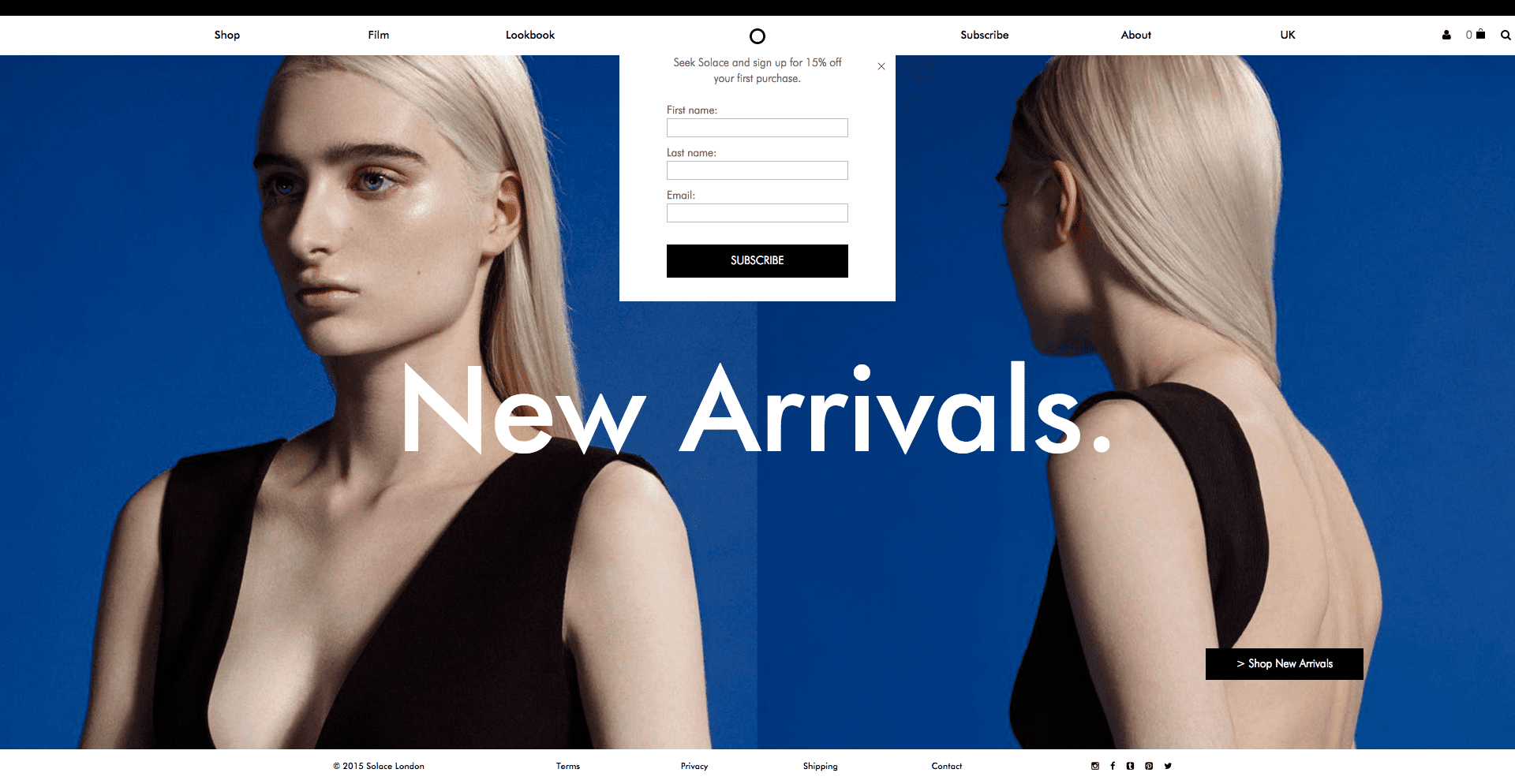
Ecommerce site selling women's dresses
This ecommerce site above selling women’s dresses is an example of how not to optimise your homepage for conversions. The user is greeted with a large banner, covering 95% of the screen, with a text overlay saying ‘New Arrivals’. At this juncture, it’s difficult to determine what has newly arrived. Nothing on the site indicates that it is a women’s clothing store, let alone one exclusively selling women’s dresses.

Only 3 indicators exist communicating to the user that the site is an ecommerce store:

                1) The ‘Shop’ link on the navigation menu on the top left hand side

                2) The basket logo on the top right hand side

                3) The ‘>Shop New Arrivals’ call-to-action button on the bottom left hand side

All these 3 indicators are lost within the top corners of the screen. The user has to work to get to some form of product to even start the conversion journey. Although everyone loves a good game of hide and seek, your ecommerce website is not the place to do it. This is a great example of design taking precedence over purpose.

This bean bag e-commerce site is an example of a business getting it right. As the user lands on the homepage, they are immediately greeted with product. It’s not pushy or in-your-face either. Products are situated below banners that have enough design edge to give this company’s website branding. Notice the trust signals and USPs (unique selling points) around the page too. The colour contrast of their Trust Pilot rating makes it easily visible while the signage stating how all items come with free postage and packaging is one of the first things you see.

Great Bean Bags Page

Having a branding and design edge is essential but don’t let it cannibalise your business focus. By the same token, ensure your homepage offers enough content to keep your users engaged but don’t swamp them. Get the balance right to avoid falling at the first hurdle

2- Consider your mobile strategy

MCA Responsive Website

Danyl Bosomworth recently wrote how we’re way past the mobile tipping point and he’s right. In 2015, your site now needs to be mobile-friendly. Statistics on mobile and more specifically, mobile commerce, have flooded the internet for some time now and the exponential growth predicted by many economists has proven to be exactly on-point.

Now in 2015, mobile users have surpassed desktop users. 1.91 billion people around the world own a smartphone with this figure expected to grow to 2 billion by 2016. As far as mobile commerce is concerned, 62% of smartphone users have made a mobile purchase in the past 6 months. It’s also become an integral part of the purchase process, with 80% of users using their device as another avenue to browse.

The reality is, if your ecommerce site isn’t optimised for mobile, you’re simply disregarding a large proportion of potential traffic. This motorcycle accessories retailer, who only launched online in April 2014, has already seen mobile and tablet account for 39% of their total online revenue. It’s also attracted an additional 66,000 visitors to their site since launch, according to their Google Analytics data. Optimising for mobile devices has allowed them to market to an audience they perhaps previously wouldn’t have known.

With Google changing their search algorithm in April 2015 to reward mobile configured sites, everyone is now fully onboard the mobile band wagon. Even I, a self-confessed mobilecommerce-technophobe, made my first purchase on mobile just last week. For help on optimising your ecommerce site for mobile, read Google’s Mobile Guide.

3- Make product pages your own

 A lot of ecommerce product pages will naturally follow the same format. Product titles, images, product descriptions and ‘add to basket’ buttons are featured on almost all, but there is a whole host of additional content you can add to make your product pages really shine. Consider trying these ideas below:

  • Writing original & engaging product descriptions

This is where several ecommerce product pages fall short. Duplicate product descriptions, usually copied from the manufacturer’s site, is an all too familiar issue for SEOs. Writing original copy not only benefits your search engine performance but it also injects personality into your pages, differentiating you from the competition. Try adding some uniqueness into your product descriptions by detailing your experiences with particular products, e.g. what you like most about them. It may be a daunting task, writing original product descriptions for potentially thousands of products, but if you chip away at it month by month, the results will speak for themselves. Bullet points alongside blocks of copy improve readability too.

  • Using high resolution imagery

Small product imagery is frustrating for users purchasing online. A hi-res image can prove a great conversion tool as it’s the most tangible thing a user has to visualise the product in a world where they can’t actually pick up and handle the product. Try adding several hi-res product images, taken from different angles, to benefit the user experience further. Zoom and spin functionality will likely be appreciated too.

  • Including customer reviews

User generated content has massive benefits online for several reasons, but in the product page environment, it’s a great way to establish trust with your customers. It shows users that customers have purchased securely from you before, with no hassles, and have been pleased with the service. Obviously, you need to think twice about including negative reviews - especially if you’re selling your own products - but if you decide to do so, maintain your reputation by actively replying to comments.

  • Creating further informational resources

This will really set your product pages apart. Adding resources like videos, how-to guides, buyers guides, size and fit guides etc, is great content to add to your site and can prove integral to the conversion path. Check out this garden building retailer’s product pages for example, they go way above and beyond a product page’s usual line of duty, adding several pieces of informational content to the page.

Dunster House Product Page

Again, it’s all about building those trust signals. You’re providing a well-informed customer experience that offsets the major flaw of online retail, i.e. users obviously not being able to evaluate your products in the flesh. This type of content also increases the chances of your site being naturally linked to and shared online.

  • Adding stock, payment and delivery information

It’s a very frustrating user experience when users add items to their basket to then find out the products not in stock, isn’t deliverable to their area or their preferred method of payment isn’t supported. Help your customer out by illustrating all this information on the product page. This will reduce your abandonment rate and pave the way for more conversions.

  • Using prominent call-to-action buttons

The product page is the final piece of the puzzle before the user enters your checkout. Bridge the gap seamlessly by using prominent call-to-action buttons. Make sure your ‘add to basket’ buttons are sizeable, attractive and visible amongst the rest of the page. Try giving the buttons a different colour scheme to the remainder of the page to make them stand out better. Use a larger, bolded font to aid the visibility further. Consider using ‘add to wishlist’ style functionality to encourage users to revisit your site.

  • Using social share icons

Encourage users to share your products by adding social share functionality. Make sure the major social sites are covered as well as the more visually focused platforms, i.e. Pinterest and Instagram. These come with the benefits of having a user base that’s more retail focused.

4- Spend time thinking about why users are abandoning your checkout

Abandonment rate is a metric that plagues many ecommerce marketers. It’s something they’re always refining, streamlining and optimising to ensure no barriers are being presented to the user. And it’s no wonder really, getting users to convert online is an extremely difficult thing to get right. Did you know that 98% of website visitors never convert and from those that do, 70% don’t make a repeat purchase? It’s time to start thinking like an ecommerce marketer and spend time analysing your checkout.

Start by examining how long your checkout process is. The key goal here is to ensure it’s as simplistic as possible and doesn’t drag on. Start by reducing your amount of checkout pages. It’s not necessarily a case of reducing it to 1 page - many sites try this and the content often becomes cramped - but try condensing any superfluous pages together. This will eradicate unnecessary page load times and negate any abandonment issues due to users waiting around.

You can use account creation functionality to make repeat purchases even quicker, too. Users can save their personal information upon registering and be presented with it immediately next time they login. All that’s left is for them to click the final ‘make payment’ button. You can do this by including third party payment systems too, like PayPal and Amazon Payments for increased ease and flexibility.

It’s also a good idea to remove any possible distractions within your checkout area. Common tactics include removing the header, footer and any other on-page links that may navigate the user away from the checkout. Be sure not to stray too far away from the aesthetic of the website though, as this might discourage and confuse the user.

If a user is considering leaving your website, either from the checkout or just a regular page, consider installing an exit intent lightbox to salvage something from them. The lightbox could be a newsletter sign-up, in order to grow your mailing list, or simply a promotional code to encourage some repeat custom. Yieldify specialise in this form of promotional code light box and are well worth checking out, especially if you do not have the resource to program an exit intent lightbox yourself.

Keep refining and trying different approaches to see what conversion methods work for your checkout. Ecommerce marketing isn’t all about attracting new customers; it’s also about influencing and directing customers correctly once they’ve landed on your site. Consideruser testing services and analysing data on Google Analytics to make more informed decisions regarding your abandonment rates.

5- Be creative with social media

Used creatively, social media can go way beyond your average 140 characters-a-day posting. All that’s required is a little inspiration and in some cases, boldness. With the right ideas and execution, you can encourage your social media followers to become customers on your site.. And the best part is, it can be totally free. Here’s 3 ideas to get your creative juices going on how to promote your ecommerce store on social media:

  • Competitions

The beauty of ecommerce stores is you’re dealing with commodities. It’s nothing abstract like a service; you’re dealing with tangible items that your customers interact with. This can easily be translated into some kind of competition where you ask your customers to use your products in a certain way. Execute the competition with a hashtag to pull all the entries together and that’s about it. You now have yourself a competition that’s not resource heavy. Be sure to understand the promotion guidelines from each social network before starting a contest.

  • Promotional Codes

Ted Baker Instagram

More and more brands are starting to use social media to advertise their promotions. Couple this with a creative approach, and you have yourself an engaging social media campaign. Ted Baker did this perfectly in early 2015, going to Instagram to promote their Spring/Summer 2015 collection. They invited users to regram images onto their feed and by applying a filter, it revealed a secret promotional code.

It doesn’t have to be as ‘out there’ as the Ted Baker campaign either. Create an image featuring a promotional code and turn it into a jigsaw using this free online tool. You can then share the unique URL on social media. Alternatively, post the promotional code onto social media and state how it’s valid to the first 50 users who input it. Whichever approach you do choose, you’re likely to see increased engagement rates as your incentivising your follower base.

  • Feature your customers

This might be easier for those with a physical store but still achievable to those without. Encourage users to send in photos of themselves with their newly purchased product. You can then post these on your social media channels. This provides very shareable content as their friends and family will be inclined to forward the post onto their followers. This budding East Midlands based skateboarding business employs this strategy regularly on Instagram and Facebook and with great results. Their Instagram feed now has over 4,000 followers which is an impressive feat for a small ecommerce site.

The idea is to look beyond the immediate function of the social media site and use its capabilities in a creative way. It’s difficult to think outside the box on demand, but with a little online research, you can adapt an existing creative social media campaign and apply it to your business.

So there you have it; 5 tips for optimising ecommerce sites in 2015. There’s always going to be a whole host of other things you can do, but these suggestions are based on issues I consistently come across. It would be great to hear your thoughts and other suggestions you may have in the comments below.


from Smart Insights http://ift.tt/1hR5sCV
via IFTTT

Google to start blocking Flash from today [@SmartInsights Alert]

Google Chrome will pause all ads using Adobe’s Flash whilst Amazon will ban flash ads outright

Importance: ★★★★★ (for Digital Advertisers)

Recommended link: Google's announcement of change from September 2015

As of today Google’s chrome web browser will not play ads created using Adobe flash and will automatically pause them so they don’t disrupt Chrome users' browsing experience. Google have framed this in terms of improving browser speed and battery life. Other Flash interactions or animations you are using on your site shouldn't be affected, as explained at the end of this alert.

This is significant for advertisers since according to a report from the mobile ad management firm Sizmek, Flash was the most popular format for digital display ads as recently as Q1 2015. Advertisers tried to deliver more than 5.35 billion Flash ads in Q1 2015, compared to 4.25 billion HTML 5 ads. Flash ads will still appear on Google chrome, but users will have to click them in order to play them, rather than have them play automatically.

Chrome

Amazon has gone a step further than Google and outright banned advertisers from submitting flash ads to its site, they have timed the implementation of this ban to be on the same day (September 1st) as Google Chrome will be auto-pausing Flash ads. According to amazon, they are banning flash ads to ensure that "customers continue to have a positive, consistent experience on Amazon."

Does this my display ads are going to be less effective?

Because a sizeable majority of online advertisements use flash, you may think this announcement from Google is bad news for digital advertisers, but it doesn’t have to be. Google has introduced tools to let you convert your Flash ads into HTML 5, so their display won’t be affected. Adwords will also now automatically convert Flash into HTML when it is uploaded by default. If you want to continue to use Flash you can, but you have to opt to do so. Google also has a number of tools that let you create HTML ads easily, so you don’t have to rely on flash. And if that wasn’t enough, Google will now let you upload HTML 5 ads directly into AdWords. If you need to know more about how to convert your Flash ads into HTML 5 Google has put together a useful post to provide you with the information you need on how to do so.

This means it is easy to avoid being penalised by this change by Google, you just have to be ready to convert your ads into HTML 5- which won’t be hard if you follow Google’s advice.

Does this affect other Flash content on my site?

It shouldn't in theory... According to the original announcement when this was introduced as an option in Chrome:

"don't worry, the primary plugin content on pages (games, videos, etc.) should still run just fine...'

Still, if you use Flash visuals or interactions on your own site it's worth checking that they still run OK.

Image credit: Stephen Shankland


from Smart Insights http://ift.tt/1Jzzm7F
via IFTTT

Where to start with optimizing your ecommerce store

Taking control of your online store to stay competitive

By customizing online stores, merchants are getting much more extensive business opportunities. Of course, it's quite difficult and sometimes rather expensive to customize your own web store, but looking at possible gains we can definitely say that it's worth doing. It doesn't matter whether you will adjust a site on your own or hire a professional developer for this purpose, remember that customization gives you the opportunity to take a competitive edge on the tough ecommerce market.

Currently, there are plenty of well-known web stores that impress people with their style, design, functionality, speed and advanced technologies used. So what should a new vendor to begin with? It isn't necessary to order full-fledged customization at the very start (though highly desirable) - you can just go with a single or couple of specific options that will allow you to stand out.

Customizing your ecommerce store

Below I will try to outline all the advantages of professional ecommerce customization.

Design and layout

To tell the truth, now it isn't enough to launch a web store with the standard template design, so you’ll definitely need to create your own unique style. With some advanced theme editors, merchants can get the opportunity to create unique (to some extent) layouts even without professional assistance. But in order to look stylish, creative web design is a must.

Usually, ready-made ecommerce software like cs-cart.com  or Magento  allow you to make some basic customization on your own and you can always opt for professional assistance when required.

 Advanced functionality

Remember that customization of your online store can improve its basic functionality substantially. First of all, don't forget to ensure that your web store is accessible properly in all major web browsers.

With the help of software add-ons you can expand essential features of your online store. These applications are used for special purposes like searching or on-site chat support integration, for example.

You can also ask to integrate video or audio assistants or comprehensive knowledgebase. Different payment gateways, affiliate add-ons and gift registries are also good samples of ecommerce functionality improvements.

Speed and convenience

Someday a store owner realizes that a current web store doesn’t meet the growing market trends. Then it's high time to scale it up to a larger size while improving its overall speed and performance. Loading speed optimization will allow you to work with much more extensive data volumes, without sacrificing of their response time. With professional web developer assistance, you can integrate video and audio data and make your product showcases much more convenient and attractive.

You can hardly expect your prospect to wait for a while before your web pages are loaded. This is where the risk of switching to more convenient and fast competitor projects arises. Speed and convenience of usage are crucial aspects for any online venture and you should pay a special attention to these points.  Some easy-to-use and convenient online tools for checking page speed and performance, include Pingdom and Webpagetest.

Cloud-based technologies

Cloud computing is the next level in ecommerce business development. With the help of cloud technologies you can make your project accessible almost 100% of time from any location around the Globe and ensure its really hassle-free performance.

You shouldn't be afraid of losing mission-critical data and information because the integration of cloud-based technologies provides required redundancy. It's also possible to implement server resource allocation on-the-fly – just whenever you need them most.

Among this type of technologies I refer primarily to cloud-powered search and CDN (Content-Delivery Network) support.

Mobile and Social Media integration

Today if you wish to get your prospect attention and additional exposure, try to reach them with social media integration. This will help keeping constant customer communication and interaction active. Also, each of your customers can be informed about some special deals you have and new product offers. This information can be easily shared with their friends, serving as an additional advertising stream.

As for the mobile integration, I can say that this is a really important aspect in the age of smartphones and tablets. Every day people go shopping via mobile devices, that's why one of the main targets is to meet customers with the mobile optimized version of their favourite web store. Another option is to create a specific mobile application for mobile shopping. With the help of professional web development assistance, it's possible to take advantage of even more advanced m-commerce opportunities.

Do you know some additional benefits of online store customization? Don't hesitate to share your thoughts in the comments below.


from Smart Insights http://ift.tt/1hQCfId
via IFTTT

Using Email to boost event and webinar attendance

Get those seats filled with these many and varied tips from 10 Email marketing experts

Whether virtual or physical, events are a mainstay of marketing to engage new prospects and build relationships with existing contacts.

When you’re responsible for marketing an event it might be something you only do a handful of times a year, so I’ve rounded up some tips from seasoned experts on how to use email to ensure you pack out your event. Read on to find out what you should say and how often to say it.

Once you’ve read the advice below, continue on to the examples of event invite emails and why they work for everything else you need to get your event promotional campaign organised.

Justine Jordan, Marketing Director at Litmus

Justine Jordan Marketing DirectorFor webinars, send a stand-alone email! We used to send newsletters with webinar registration links inside, but have found that sending dedicated emails for each webinar results in many more registrations.

We also state very clearly in the email that you should sign up even if you can't attend, since we record all webinars and email all registrants a link to the recording. This means we have lower attendance numbers compared to registrations, but more engaged customers viewing our content in the end.

For in-person events, use location data to your advantage. We increased open rates by 209% by sending regionalized emails to subscribers. While promoting The Email Design Conference 2013, we sent segmented emails to subscribers in three locations—San Francisco, London, and Boston. By looking at the regions where subscribers opened our previous communications, we were able to target emails specifically for each event. These targeted emails saw a 68% open rate—while the general email saw about a 22% open rate—and directly resulted in 58 tickets being sold.

Kath Pay, Marketing Director at cloud.IQ

Kath Pay from CloudiqGet the event title right! The title is like a subject line and needs to be carefully crafted to not only get the audience's attention but to also ensure the WIIFM (what’s in it for me) factor is very clear.

My second tip is to organise an automated event flow which covers the marketing of the event, the pre-event information and reminders and post-event information and thank you. All of this is kicked off by the initial marketing email promoting the event and from then on its automated, and goes to the relevant recipients according to their actions. A basic example of such an event flow is seen below. Of course this can be as simple or as complex as you like.

Automated Email Campaign Flow


Samantha Iodice
, Email Strategist at samanthaiodice.com

samantha iodiceIt's important to email the right segments for the event, otherwise there is risk in increasing unsubscribes and causing general annoyance, which is never a good thing. Presuming that this part is well taken care of then send a series of emails.

The key, and the secret ingredient, is creating anticipation of the event. Depending on the event, the first may be a 'watch your inbox for an exciting announcement' variety. This would be followed up with the 'big reveal'. A final would be of the 'last chance" variety. A discount at the witching hour is an extra bonus to spike up enrolment too.


Dela Quist
, CEO at Alchemy Worx

Dela QuistThe number one email marketing tip for promoting a webinar or paid physical event is maximise email frequency. There are different ways to sensibly do this.

  • In the context of building up to an event, people get (and tolerate) you will want to email more in order to build anticipation and get bums on seats, so playing with upping frequency definitely worth exploring.
  • Put together a series of emails with different content addressing different benefits and aspects of the event; featuring a speaker (with links to their blog/video of them speaking elsewhere), X takeaways you’ll get from session Z, what people said about last year’s event (real quotes), 5 reasons your boss should want you to attend, speaker Y gives us a sneak preview of what they’ll be talking about etc. Each of these can be a separate email and will still give the nudge, rather than repeating the slightly desperate ‘It’s not too late to book’ message over and over again.
  • Use social proof to nudge your audience. Change the subject line from things like ‘Don’t forget the early bird discount’ to ‘Join 1560 sustainability professionals at our world development conference’. Very specific numbers give credibility and in this case the message builds the fear of missing out.
  • Play on the benefits for business AND individual.  This could mean for business things like stay ahead of the curve, don’t get left behind but for the individual the message is boost your skills, learn from the best.
  • And finally, use multi-element subject lines to cram in more info about the event into every mail, for example “Join 34000 digital marketers at event x | Expert speakers include a b c | Book today for early bird discount”.

Chad White, Lead Research Analyst at Salesforce Marketing Cloud

chad whiteThe biggest opportunity around events is to address the journeys that happen (1) during consideration, (2) post-conversion but pre-event, (3) during the event, and (4) post-event.  A person on each of those journeys has different needs at different points, and there are great opportunities to use personalization, dynamic content, and triggered emails to address those needs and drive the desired behaviour.


Skip Fidura, Client Services Director, dotMailer

Skip FiduraEmail marketers tend to spend too much time worrying that they are 'bothering' or 'spamming' their recipients but then we leave the office and behave completely differently with our friends.

As an email marketer we will send out an email inviting somebody to an event if an email goes unopened or unclicked that is where the communications end because we are afraid of causing offense. If you invited a friend over for dinner and they didn’t respond you would follow up either with another email or you might change up the channel. Don’t be afraid to ask someone to your event more than once.

The reality is that your event probably was not the most important thing on their mind if the recipient even saw it. They will appreciate the follow-up.  You could even take it further and put three different calls to action in your event emails: yes I would like to attend, I am not interested in this topic but invite me to other events, I don’t attend events, please don’t bother inviting me in future. Just make sure that last one is worded such that you do not inadvertently unsubscribe them from all future email communications.


Jordie van Rijn
, Founder of Emailvendorselection.com and Email Marketing Consultant for EmailMonday

jordie van rijnSend a follow up email if they haven’t registered, using an email series works well; early bird, introduce the speakers, offer, follow up, last chance. But even if they have registered, no-shows are a pain, so send a reminder the day before a live event, possibly to print their ticket. Consider adding a no-show fee even if your physical event is free, to give people a real reason to not cancel last minute.


Dave Chaffey CEO and Author of  SmartInsights

Dr Dave chaffeyWebinars are typically free and there are a lot of them, so it it's all down to the 'I MUST know this'  or 'I'd like to listen to THEM' value you can show in those first few words in the subject and then leading into copy to make it realistic.

Of course, you won’t convert someone to a paid physical event in a single communication, so it's about being relentless in smart way. So, Sense and Respond!  Look at engagement of individuals across emails, i.e. look at who has clicked through to the event page and browsed around, lead score and then follow-up by an email to show more or dare-I-say-it, phone!

Parry Malm, President at Howling Mad

parry malm

I've sent out thousands of event invitations over the years. In college I ran a bunch of semi-legal poker tournaments... and email worked. Then I ran marketing teams for a bunch of global conferences and exhibitions... and email worked.  Now I have a birthday party once a year, and no one comes.  But that's beside the point, it's not email's fault.

What I've learned about event invitations via email is simple: the more you talk about event features, the less it works as a response channel.

Every event has a bunch of features that those who run the event are mega proud of. A great keynote speaker, an amazing headline band, whatever.  But that's not what gets 'bums in seats.' That's simply a grandiose expression of pride in one's work, which is laudable but not purchase driving.  It's simply not something customers respond to (source: Marketing 101: Features vs Benefits.)

Case study: last Autumn I helped a local London death punk band promote themselves for a tour of Sweden.  We tried a few things - announcing concert dates and new singles and the like.  That didn't do much.  Tickets weren't exactly flying off the shelves.

What did work was explaining the experience of the impending shows - and big thanks to Google Translate for making it happen in Swedish - it was something like 'Hate. Pestilence. Drugs. Volume. Broken. Death. Noise.  The hellfire is coming and Sweden can't stop it.' Maybe it wasn't your mother's garden party, but we understood our audience. And it showed.

Every gig was sold out.  And, as it turns out, Sweden couldn't stop it.  They love a bit of amphetamine-fuelled leather n denim sh*tstorming.

My point? Events are about experience, not about organisers bragging about how great the event is. Focus on the experience and you'll win.

And please, please, please, stop saying 'early bird.'  The worm is dead, deader than a guttural junk rock band from north London.

Ps - the band is called Generation Graveyard.  Check them out... if you dare.

Tim Watson, Email Marketing Consultant at Zettasphere

tim watsonThank you to all the experts for their contributions, there is a clear common theme, if at first you don’t succeed, keep trying. The number one mistake is to be too shy in promoting the event; one email is not going to pack it out.

Finally remember to plan for and make use of the content generated by the event afterwards. Re-purpose and re-use the content.

Not only offering downloads of event recordings but take out key information, create a series of blog posts, emails and re-package into whitepapers or guides that can be offered as downloads too.

Now with all that great advice you next need to work on the invitation emails. For examples of real event invitation emails and what makes them great take a look at this post on irresistible event invitation templates.


from Smart Insights http://ift.tt/1vIPj2m
via IFTTT