Slideshare

martedì 19 maggio 2015

15 handy tools for hands-on content marketers

Digital marketing tools to support your content marketing strategy

digital marketing tools

The importance of content marketing in a business cannot be overlooked especially in our current market that is consumer centric. Long gone are the days where creating billboard ads and radio spots were enough to get your business to the next level. Today, consumers want more and they need to have something they can relate with in order to feel a part of your business.

Content can help you to craft a story about your business to help you connect further with your customers and to share your unique values, showcasing the personality of your brand.

It's not easy to get started with your content marketing strategy.  Before any success story can be realized, a business needs to have the right tools in place to be in a better position to fulfil the business goals. Think in the lines of a marketer or a journalist and create content that is not only informative but interesting as well. You need to keep your audience intrigued so that they can keep on coming back for more.

I have drawn up these fifteen tools to support your with our content strategy.

Tools for content research and discovery

  • Google Trends

With this tool at your disposal, it can go a long way in helping you to track the popularity of keywords in Google Search over a specified period of time. Google Trends also allows you to see the things that are appealing and popular among people.

  • Topsy

An awesome tool when it comes to identifying trending topics and shareable ideas. The tool is available as both a free and paid version to match the needs of its users. Topsy has the ability to search content across links, tweets, videos and photos to address the multiple needs of the users. Besides, in addition to Topsy you may also try such tools as Wefollow and Ritetag.

  • BuzzSumo

This is research a specific keyword to identify the content that is being shared the most relating to the keyword. With these search recommendations, you can then create your own.

  • Alltop

Upon selection of a keyword, Alltop will provide you with an array of articles which you can use to generate ideas for your own content. The results you get are strictly linked to the keyword you input into the tool.

  • HootSuite

Hootesuite is very effective especially when it comes to managing multiple social media accounts. It's a free tool and this is why I am homing in on it, even though there are an array of automation tools available which are paid services. This platform helps the user to successfully synchronize the different social media accounts. In addition to this, it is also effective in helping on find new topic ideas for your audience.   

Tools for content creation

  • Copyscape

Your content needs to be unique and original. Part of ensuring this is possible is through protecting your online content. Copyscape is designed to help you ensure that the content you create is 100% unique and original. Plagiarism is not tolerated anywhere and with Copyscape, you are guaranteed protection.

  • Google Keyword Tool

Ranking amongst the top sites on the major search engines is what we all want. However, achieving it is not easy. With this keyword search tool, you can search for the right pairing of keywords to use throughout your content. When properly done it can greatly generate traffic to your site. It helps when building an advanced search funnel.

  • Portent

The fact the Portent provides you working titles that can help you build content can be seen an effective way of getting you started with your content. In most cases, this is normally seen as the hardest part during content creation. Simply just type in the keyword and the tool will generate titles.

  • Wordcounter

Besides just helping you get the correct count of your words and character, Wordcounter by Essaymama is also capable of identifying words and phrases that are most repeated hence giving you an opportunity to make adjustments.

  • Canva

Content creation also involves images and graphics. In fact, visual content is believed to have carry more weight as compared to non-visual content. Canva is a tool that is designed to help the user generate beautiful graphics without even the need of having a designer's skills. The program was developed with a very simple interface that allows you to drag and drop content before creating the graphics.

  • ThingLink

This interactive media tool is ideal for creating engaging content. It does this by helping the user to add amazing media links to photos and videos. The program can be used to create interactive news photography, maps, posters, infographics and catalogues amongst other types of media.

  • Piktochart

This stunning tool is designed to offer assistance when it comes to creating infographics. Piktochart comes with well over 100 theme elements that can be used in the process together with images found in the library. You can also opt to upload your own images and use them as you please. In addition to Piktochart you may also want to try Infogra.me.

Tools to help with content planning

  • Sprout Social

This scheduler is designed as a social media monitoring tool that has the ability of allowing its users to schedule messages and posts on the different social media channels including LinkedIn, Facebook and Twitter. Besides just queuing posts and cross-post content, Sprout Social can also allow you to integrate RSS feeds for sharing.

  • Gather Content

This involves a simple procedure using site mapping tools to easily consolidate content in a new website or even in the case of redesigning the site. Using the drag and drop technique, you can simply organize the way the content appears in the website, it makes it easier to structure the entire workflow. Planning involves increasing pages, collecting content, uploading the data and finally saving. The project can be managed by assigning pages, creating due dates, deliberating content elements, and establishing status approvals and transferring the contents to the desired CMS.

  • Compendium

Most if not all businesses strive to maintain a consistent message for their brand. Compendium is a program that is specifically designed to help you with that. The tool allows you to easily create and place appealing content both from inside and outside your company.

Image Credit: 123rf.com


from Smart Insights http://ift.tt/1EZrbNr
via IFTTT

Introducing the OGSM model framework

A practical tool for linking business or digital vision with goals, objectives, strategies and KPIs

Do you know OGSM? It’s not as interesting as the text speak version looks to be (try inserting some vowels...), but it is a widely used approach for getting focus for translating a vision into business and marketing strategy.

I was prompted to write this post since I was recently discussing OGSM with an Expert member who was using it to show how their digital transformation initiative linked to their business vision and objectives.

I think OGSM is a great tool since it's a simple way which shows the importance of aligning strategy with goals and then putting in place measurement to check you're on track and can be agile to adjust tactics to meet the broader objective. It's similar to the techniques we cover in our guide to aligning goals, strategies, objectives, KPIs and dashboards.

The deceptively simple framework of OGSM gives businesses a tools to crystallise key strategies and initiatives whilst keeping focused on their long-term vision. With OGSM, businesses from multi-national corporations where it originated to the smallest of start-ups can easily define their strategic plans. Plus, because it fits on just one page, it offers a clear, simple and concise roadmap to success - we like one page summaryies.

What is OGSM?

OGSM stands for objective, goals, strategies and measures. It's a way of defining what you want to achieve, and how you will get there. The model divides your aims into broad objectives, fixed and measurable goals, strategies to guide your actions, and measures to give you a direct way of monitoring your progress. Here is how the parts of the OGSM model link:

OGSM model framework

Here's a more specific definition of OGSM:

Objective: Defining an over-arching breakthrough vision

  • Stable, concise and linked to company mission

Goals: Stepping stones to achieving the higher level objective

  • Specific, Measurable, Achievable, Compatible

Strategies: the choices we make to achieve our objective

  • Where we choose to focus
  • Should be flexible

Measures: Numerical benchmarks on our progress

  • KPIs used as checkpoints to determine if our strategies are working

Where does OGSM originate?

The true origins of OGSM are unclear, but it's claimed that it was first devised in Japan in 1950 before being translated for American corporations. Research suggests that consumer goods giant Procter & Gamble played an important role in refining and championing the model, and it has been taken up by such major businesses as Coca Cola and Mars and of course applied by  consultancy firms.

It has been developed and adapted by different consultants and you will find strong parallels in the Smart Insights approach to aligning goals with strategies.

How to create an OGSM plan

An essential part of the beauty and versatility of the OGSM model is how easy it is to implement. You don't need any special software or technical skills - you just need a single page. The most important part for success in creating an OGSM plan is making sure that you carefully and accurately define your terms: objective, goals, strategies and measures.

Objectives refers to your vision for what you need to achieve in the long term, taking into account your fundamental principles and mission statement. Goals are about specific long-term targets aligned to your objectives, which should be measurable and will often have a financial basis.

Strategies are the ways you will deploy resources to achieve your goals. Measures are the things you will monitor to judge whether your strategies are working. Overall, all stages of the model need to be strategically aligned, so that all your efforts feed back to your overall objectives for success.

Things to watch for?

Although OGSM is a widely used model people tend to define goals and objectives differently in different businesses. For example, it's common to refer to broader goals and specific SMART objectives which we do as we explain in this article on Goals vs objectives.

In the OGSM model, it all starts with your objectives - and everything else in the model should be aligned with this first element. When defining your objectives, it's vital to think big, and to think long term. Create a compelling vision for where you want to be in the future. Paint yourself a picture of what success will look like. The better your picture, the greater your chances of achieving those objectives with the help of the OGSM model.

I hope you find this explanation of OGSM useful, like all business models it's a framework that can applied differently in different situations. If you have used it, I'd be interested to hear how you find it and any adaptations you have made.


from Smart Insights http://ift.tt/1KhmeGh
via IFTTT

lunedì 18 maggio 2015

The State of Mobile Marketing 2015 [Infographic]

Showing the huge impact of mobile marketing across web, social, display and email

The rapid rise of smartphone and tablet adoption has affected almost every aspect of digital marketing. The impact ranges from the most recent 'Mobile-friendly' algorithm changes to Google's smartphone search results through to the lower conversion rates on smartphones, use of social media on mobile and ensuring that our emails are mobile-friendly.

In our latest infographic with JBH Marketing, we've brought together all the most important changes in a single infographic to highlight the areas needing attention. We start with showing the tipping point reported where mobile users now exceed desktop users - it's coloured 'Red for Danger'.

2015 State of Mobile Marketing infographic


from Smart Insights http://ift.tt/1deOzjm
via IFTTT

What is the best way to engage your Twitter followers? [Infographic]

How to respond to your Twitter interactions to increase engagement

Twitter users have high expectations and if you have a Twitter presence, regardless of whether you are using it as a platform for customer service or brand awareness, then it's important to respond quickly and appropriately, or it could be damaging to your brand.

Did you know that only 15% of the FTSE 250 companies respond to tweets? this is worrying given that 17% of consumers are using this channel to ask questions to leading brands.

Like any social media channel, you should only post content if you have a strategy and the resources to interact in a two-way conversation to engage with your followers. Leadsift's research has drawn up a snappy visual to provide a toolkit for responding to your Tweeters to maximise engagement.

So how should you respond to your Tweeters?

Tips include: Not including a CTA link in your first sentence, personalising your response by their name and considering using punctuation:

LeadSift Twitter Guide Infographic


from Smart Insights http://ift.tt/1Fng2JZ
via IFTTT

Why Power Editor is the best way to create Facebook ads

A tutorial on creating ads in Facebook comparing Power Editor to Facebook's self-serve Ad Manager

Most people I meet on training courses who advertise on Facebook, naturally start with Facebook's Ad manager since they don't know about Power Editor. In this tutorial I will explain the ad creation process using the self serve tool and I'll show you how much better it is with Power Editor.

If you don't know it Facebook's Power Editor is a Chrome application which I'd strongly recommend for anyone creating ads in Facebook. It's pretty essential for big, regular advertisers, but what you may not realise is how many benefits there are even in a single ad.

First: go to the Ads Manager

You'll see something like this. Select "Create Ad".

Facebook Ads Manager

Step 1: choose your campaign objective

Facebook campaign objective options

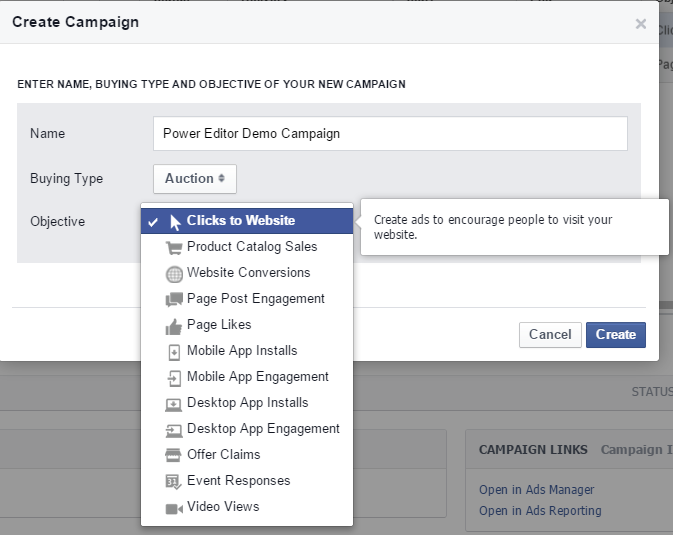
Now compare the approach in Power Editor - note the different buying type options and a slight difference in objectives.

Power Editor Setting Campaign Objectives

Step 2: Targeting

Targeting is a lot better in the Ads Manager than it used to be. Here I am targeting two Website Custom Audiences (people that have been on The Digiterati's website in recent days, or our partner training provider MMC Learning's site):

Ad Manager Targeting

Ad Manager Targeting

Note how the Ads Manager is simply telling us that the audience is too specific (i.e. too small). I get far more information from Power Editor:

Power Editor Targeting

Power Editor Targeting

Other than this, targeting on Ads Manager and Power Editor is pretty similar in terms of features. The process you go through changes a little on Power Editor in that the creation of your Ad Set is very clearly defined. It is also possible to bring in the Power Editor file naming tool I referred to earlier.

Step 3: Creating your ad

Here's one area where the Ads Manager has an advantage over Power Editor. You can use Shutterstock's extensive collection of stock images at no extra cost.

Using Shutterstock images on Facebook ads

I've uploaded my own image because I wanted to show some text on it so created it in a graphics programme (Canva is a helpful tool if you need something quick, free and easy).

The next part is where things start to get VERY different on Power Editor and where it seriously starts to flex it's superior muscles.

Below is the ad I wanted to create. In fact, the ad copy you see here in the Headline, Text and Link Description are EXACTLY what I was allowed to use in Power Editor. But here on the self serve Ads Manager I'm running into problems.

Ads Manager limitations over Power Editor

Ads Manager limitations over Power Editor

Ads Manager Error Message

Ads Manager Error Message

Ads Manager does have one newish feature that used to be Power Editor only - you get to choose a call-to-action button

But because of the text length restrictions, I had to rework my ad. This is how it ended up:

Ads Manager adjusted ad. Headlines are limited to 25 characters and cannot use symbols like | < and =

Ads Manager adjusted ad. Headlines are limited to 25 characters and cannot use symbols like | < and =

The advantages of Power Editor for ad creation

The graphs in this section show all the advantages Power Editor offers over the Ads Manager at this stage of ad creation:

  • Ability to create ads using multiple images
  • Ability to set a Display URL
  • Extra characters allowed in the Headline
  • Special characters allowed in the Headline
  • Enabling multiple tracking pixels (I wanted to track clicks to the relevant website page plus checkout conversions on Eventbrite)
Creating a Facebook ad on Power Editor

Power Editor: Ad creation advantages

Multiple tracking pixels in Power Editor ads

Power Editor: enabling multiple tracking pixels

Step 4: Place Order

For completeness, this is the final step in the process of creating an ad. Let's review what I did on the Ads Manager and then click the button (although I won't because I'll be using the Power Editor version!)

Review order Ads Manager

Ads manager: reviewing and placing the order

Need more help or advice with Facebook marketing?

Check out our Advanced Facebook training in Marie's webinars. Marie is also available to provide in-company training and coaching on social media marketing.


from Smart Insights http://ift.tt/1Hpy1la
via IFTTT

venerdì 15 maggio 2015

Children vs Adult use of the Internet and Digital Media [#DigitalInsights]

...at least not as well as the 14 or 15 year old Digital Natives...

This  Ofcom research on the Digital Day sheds some interesting behavioural insight on how children and Youth audiences engage with digital activity compared to adults. These are the 'Digital Natives' which give us a future view of how digital media will be used.

Over half of children's time is spent communicating via text, instant and photo messaging - this contrasts to 1/4 of the time spent by adults.  In terms of social networking sites, 11-15 year olds spend twice as much time as adults.

Ofcom 'Digital Day' research: communicating with adults vs children

So, when it comes to .. how much time do 11-15 year olds spend on media and communication activities? Certainly, the differences in time spent on Email and Text between adults and younger audiences is dramatic.

As mentioned earlier, this age group prefer to instant message or text their network, and 30% of their media consumption takes place between 6am to 6pm. In terms of media overall, they watch few programmes on the TV itself, though this could be distorted by the use of tablets and mobile devices. Looking at their activity, the young digital natives spend a high proportion of their time playing games as shown:

Ofcom research 11-15 year olds media consumptio

What does earlier research tell us about the use of digital communications by demographics?

Ofcom researched over 2,000 adults and 800 children to find out the differences in technology usage and interests, and their Communications Report which we summarised in August 2014 in our post How important are digital communications?

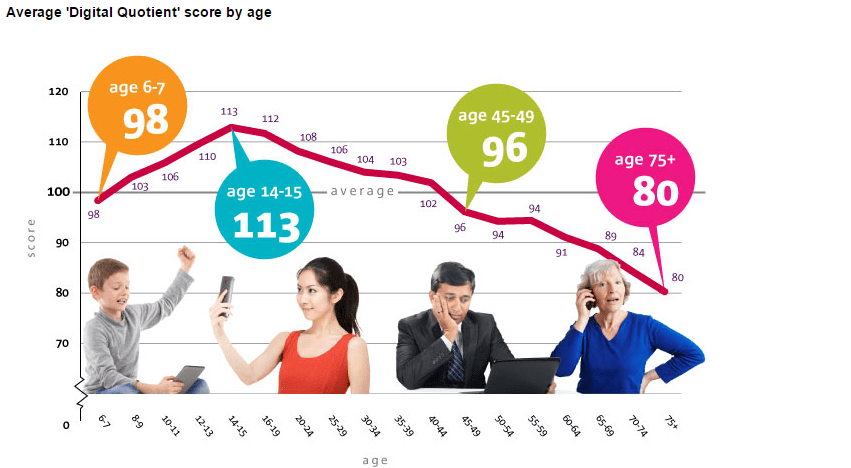
Ofcom's research assigns a digital quotient score based on knowledge, use and confidence of digital technology, with the average UK adult scoring 100.

Did you know the 'millennium generation of the 14-15 year olds are the most technologically savvy in the UK' and it peaks until our late 50s, then declines beyond 60?

ofcom.org_research_on_digital_natives

The research publishes some other interesting facts about the lifestyle and interests of the demographics and disturbing news that we spend more time using media and communications than sleeping:

  • People still read books, listen to CDs and watch DVDs despite the usage of technology and the most popular media for adults is books.
  • CDS are least popular amongst 60% of 16-24 year olds - probably due to the accessibilty to download music which is quite different to the 45-54 year olds who listen to CDs.

What are the implications? If you're a brand targeting the younger age group, you are probably already following the interests of this group by researching their interests or even crowdsourcing to get their content creation skills on your team.


from Smart Insights http://ift.tt/1Hi7UcD
via IFTTT

giovedì 14 maggio 2015

A tutorial on KeywordTool.io

How to tap the potential of Google’s search Suggest for multilingual search and better understanding of online search behaviour

As SEO has evolved, so too has the process of keyword research/analysis. The days of relying solely on Google’s Keyword Tool (now the Keyword Planner) to generate simple target keyword lists has long gone with the emergence of semantic search, Hummingbird and more longtail search opportunities. SEO is becoming ever more sophisticated and therefore keyword research must do so, too.

Whilst Google’s Keyword Planner is still an effective tool, a number of other free tools can be used to understand consumer search behaviour. And now we can add a new tool to this list: Keywordtool.io.

Keyword Tool.io

A reminder about Google’s search suggest

As with other tools like Übersuggest, Keywordtool.io uses Google’s Autocomplete engine to generate a variety of long-tail keyword suggestions based on any particular root keyword.

Google’s Autocomplete or ‘search suggest’ can be seen in the search predictions one sees when typing a query into Google:

google autocompleteAs Google themselves explain:

'Autocomplete predictions are possible search terms, not statements by other people or Google about the terms. The search queries that you see as part of Autocomplete are a reflection of the search activity of users and the content of web pages. Apart from the Google+ profiles that may appear, all of the predictions that are shown in the drop-down list have been typed before by Google users or appear on the web'.

The fact that the predictions within search suggest come from what people are actually searching for on Google means that there is some extremely valuable keyword data to be mined and utilised.

Whilst a few years old, this video from Moz still provides a good overview of Google’s search suggest and why it matters:

Moz's video on Google’s ‘Search Suggest’: Watch the video to find out.

Keywordtool.io in action

In addition to being free, the other great benefit of Keywordtool.io is that it generates up to 750 keyword suggestions, providing users with some excellent longtail keyword ideas.

Worked example - ‘summer dress’:

When searching for [summer dress] in Google, I get the following autocomplete suggestions:

Google Keyword Search Tool

As you can see, there are a good number of suggestions already being highlighted based on queries that people are actively searching for.

When inputing the same term into Keywordtool.io it displays:

Keyword.io Search Example


In the same way as tools like Übersuggest, Keywordtool.io imitates what a user might type into Google, providing a huge range of keyword variables from A-Z and 0-10.

The tool also offers the ability to show alongside the keyword ideas the search volume, CPC and Competition from Google AdWords.

Whilst this is useful, it requires a ‘Pro’ account and I would therefore suggest that in the first instance the free version will give you enough in terms of keyword ideas and you can always copy and paste the keywords into the Google Keyword Planner yourself to get this additional information.

Worked example - ‘lumia’:

Search behaviour often differs by country and therefore search qualifiers can change. With the ability to toggle by country,

Keywordtool.io allows you to explore this in more detail and compare and contrast search behaviour by country.

It’s therefore worth looking at another example to understand how keyword suggestions may differ by country and I’ve chosen to look at [lumia], a popular brand term that will be searched for globally.

Keyword.io Search Term Example


Whilst there are many similarities between the two sets of results, one can also start to pick out differences that could inform copy and content.

For example, in the UK there appears to be more queries for reviews for different Lumia models, which could indicate the UK consumers are looking for more additional information about the product before committing to purchase.

In Germany and Italy, there appears to be more queries around ‘price’, indicating that our European counterparts may be more price sensitive. This information again gives us a good indication of the type of content to produce, e.g. price comparison tables.

Export and analyse keyword data

Keywordtool.io enables you to export/copy the keyword data to a spreadsheet where you can analyse and sort further. Build up a master keyword spreadsheet and use with the Google Keyword Planner to overlay the following metrics:

  1. Monthly Global Searches
  2. Monthly Local Searches
  3. Competitiveness
  4. Average CPC
  5. Monthly traffic volume you currently receive
  6. Position in search
  7. Related landing page by keyword(s)

You can use Google Keyword Tool for the first 4 items, Google Analytics (or whichever web analytics tool you have) for 5th item and any suitable rank tracking tool to measure the position in search. With all this data to hand, you should have a useful spreadsheet to evaluate new opportunities.


from Smart Insights http://ift.tt/1H5I0qt
via IFTTT